
Welcome!
On this page, you’ll find everything you need to help you prepare for this incredible journey!
Section 1: Journey Guide with detailed itinerary
Section 2: Registration Form + Packing List
Section 3: Checklist with important to-do’s
Section 4: Tips for applying for your e-Visa
Section 5: Frequently Asked Questions
Helpful Downloads to Print and Save
Click the image to download the .pdf
Journey Guide

Packing List
Important To-Do’s
-
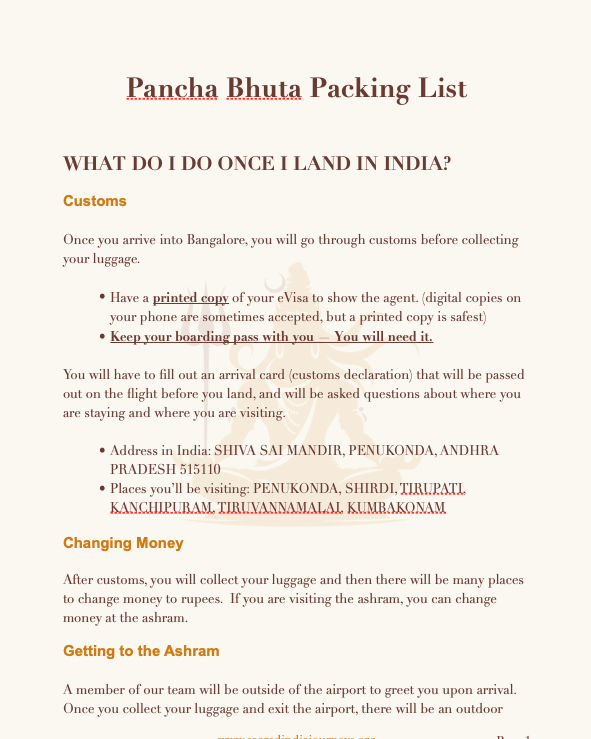
A visa to travel to India is necessary. It is a relatively easy online process and most people receive their visa within 2-5 business days. You will have the option to purchase a 30-day visa, 1 year or 5 year. The website can be a little confusing so we created a step-by-step guide that you can follow. (scroll below to next section). Once you receive confirmation of your visa, please upload on your trip portal.
-
Arriving in India
Most flights from North America arrive in India in the early morning hours. You should plan to land in Bangalore (BLR) either the evening of October 28th or early morning of October 29th. Jet lag from this long journey can be intense, so we strongly recommend arriving 2–3 days early if possible to rest and acclimate.
Departing India
The journey ends when we arrive back at Bangalore Airport (BLR) at 6:00 PM on October 16th. Please book your departure flight for after 9:00 PM on the 16th, or more likely, early morning (midnight to 4:00 AM) on November 17th.
Departing India (Rishikesh Extension)
The journey ends when we arrive back at Delhi Airport (DEL) at 5:00 PM. Your flight back will likely be early morning hours of November 21st or very late on the 20th.
Due to time zone differences and international flight timing, it's easy to miscalculate dates. We highly recommend having our team review your itinerary before purchasing (or within 24 hours of booking in case any changes are needed).
-
Travel insurance is required for all participants. Please feel free to shop the marketplace for the best options or choose the recommended insurance provider during checkout or on your travel portal.
-
To enter India, your passport must be valid for at least six months beyond your date of entry into the country. Additionally, your passport needs to have at least two blank pages for stamping by immigration officials
-
For those arriving early, we recommend:
DoubleTree by Hilton Bengaluru Airport
The hotel is located very close to the airport, making it a convenient place to rest before traveling to Penukonda.
An important hotel-booking reminder: Hotel reservations are based on the night before your check-in date. For example, if your flight arrives at 3:00 a.m. on October 27, you will need to reserve the hotel beginning the night of October 26. If you book the room beginning October 27, regular check-in may not be available until approximately 2:00 p.m. that afternoon.
Please continue to scroll below for detailed instructions on applying for your eVisa, packing suggestions and other helpful tips in helping you prepare for your journey.
FAQs
-
You should book your international flight to arrive and depart from Bangalore airport (BLR).
-
Arriving in India
Most flights from North America arrive in India in the early morning hours. You should plan to land in Bangalore (BLR) either the evening of October 28th or early morning of October 29th. Jet lag from this long journey can be intense, so we strongly recommend arriving 2–3 days early if possible to rest and acclimate.
Early Arrival
If you would like to come even earlier to allow more time to adjust to jet lag, this is also advisable.Departing India (Main Journey)
The journey ends when we arrive back at Bangalore Airport (BLR) at 6:00 PM on November 16th. Please book your departure flight for after 9:00 PM on the 16th, or more likely, early morning (midnight to 4:00 AM) on November 17th.
Departing India (Rishikesh Extension)
The journey ends when we arrive back at Delhi Airport (DEL) at 5:00 PM. Your flight back will likely be early morning hours of November 21st or very late on the 20th.
Due to time zone differences and international flight timing, it's easy to miscalculate dates. We highly recommend having our team review your itinerary before purchasing (or within 24 hours of booking).
-
For those flying from the U.S., jet lag can be quite intense, and most people find it takes 4 to 5 days to fully adjust to the time difference. With this in mind, we recommend arriving in India at least 2 full days in advance, and ideally 3 to 4 days if your schedule allows.
We’ll be staying at the Taj Bangalore Airport Hotel the night of October 9th (before departing for Shirdi). It’s a beautiful hotel located directly across from the airport, making it a convenient and restful option if you choose to arrive early. You can view or book the hotel here:
https://www.booking.com/hotel/in/taj-bangalore-kempegowda-international-airport1.htmlAlternatively, you’re welcome to spend time at the ashram of Sri Kaleshwar in Penukonda before the journey begins.
-
Yes. An Indian Tourist Visa is required to travel to India. You can obtain a Visa via this website. You will have the option to get a 30-day, 1-year, or 5-year visa, starting at $40. Be sure to apply as soon as possible to avoid any issues. Typically you’ll get your Visa in your inbox within 3 day of applying for it.
-
Your passport must be valid for 6 months after your return date from India. If not, you will need to apply for a new passport before applying for your visa.
-
As this is a pilgrimage and we are going to holy places, modest, loose-fitting clothing is necessary to enter temples. Once you register, you will receive a more detailed packing list and we will review in detail on the pre-journey planning calls.
-
The weather will be quite pleasant in January and February.
Avg. Temp. for all locations: 65° - 85° F
-
We expect there will be ~30 people for a peaceful yet energetic group dynamic. Enough that you can meet and connect with new friends, not so many that you are alone in a crowd.
-
The majority of participants on our journeys are traveling alone. You will find that while you may come alone, you will be leaving with many new friends! We will also have several planning calls in advance of our departure date so you feel prepared and aquainted with your fellow travelers.
-
You will need cash for incidentals, donating at temples (if you choose to do so), and meals or snacks that are not included
Incidentals like laundry and room service can be charged to a credit card. Even gifts and souveniers can usually be paid for witha credit card. Most people find $500 cash on hand is more than enough.
-
You will be able to change money at the airport once you arrive. We will also be able to change rupees for you at other stops on the journey, if needed.
-
Whatever the age you are is the perfect age to come to India!
Our groups tend to have men and women of all ages.
If you have any health concerns that you feel might make this journey difficult, please email Bhramari.
-
A resounding YES! We have seen the results of these journeys in people’s lives. Whatever amount you invest in yourself, you gain exponentially in return. We are proud to say that most people who come on a power journey with us end up coming again on another journey normally the very next year. This is a testament to the amazing changes they are experiencing in their life, energy, and overall well-being!
-
Yes, payment plans are possible. You will see this option when checking out. If you need a different payment schedule, please reach out to Bhramari.
-
After registering for the journey, check your inbox. We will send you a helpful list of everything you need to do prior to departing for India, including: book your flight, pack your bags, set your intention, and more. Tick off each item and exhale with relief … because you’ll know you’re not forgetting anything important!
In addition, we will host two Prep Sessions (online) where we will go over any questions and help you prepare. We are at your service long before we ever get to India.
-
This journey is for anyone wanting to explore the vast spiritual treasures of India. We will share with you about India’s rich spiritual knowledge, including meditation, yoga, Sri Vidya, Advaita, Tantra, Siddhic and Yogic techniques, and more.
-
No problem!
Please email Bhramari bhramari@sacredindiajourneys.com and she can answer all your questions or set up a time to speak.
Applying for your Visa
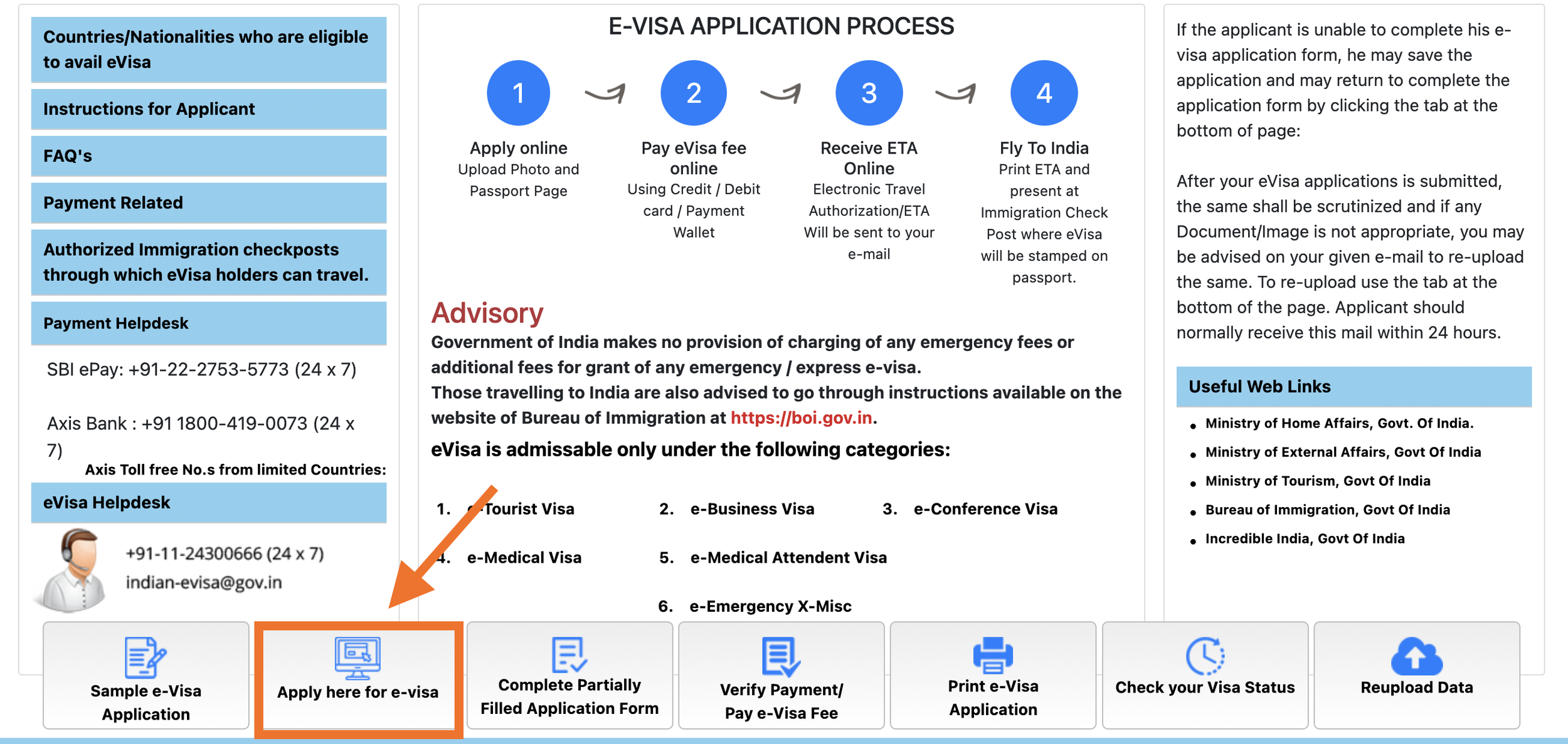
Below are some helpful tips when filling out your e-Visa. You can apply for an India e-Visa (electronic visa) up to 120 days before your expected arrival date. Once your application is submitted, it typically takes 2-5 business days to receive. However, do not wait until the last-minute in case any issues arise.
Before Filling Out the Page
Make sure you have the following files ready to load as part of the eVisa process:
Photograph for Visa (.jpg)
The photo must be square-shaped
You can take a selfie on your phone and crop, no need to go to a drugstore or somewhere for an official passport photo
The background should be plain, light-colored, or white (no trees, busy wallpaper, etc.)
This file must be a .jpg file. The minimum size allowed is 10 KB, while the maximum is 1 MB
If you need help getting the image in the proper size, please email Bhramari; she can help.
No prescription glasses and sunglasses. Ensure that your eyes are fully open and that the photo has no "red eye" effect.
Keep a neutral expression, no smiling, no teeth. *It is essential not to show teeth in the photo.
Digital Scan of your Passport (.pdf, .png or .jpg)
You can upload a scan or electronic copy of your Passport that can be taken with a phone camera.
You can upload your Passport scan in the following file formats: PDF, PNG, and JPG.
The scan should be large enough that it is clear and all the details on it are legible.
The default size for the scan is 1 Mb. It shouldn’t be larger than this.
Passport scan should be in color, not black and white.
The MRZ (the two strips at the bottom of the Passport) should be clearly visible.
PAGE 1:
Go to this website to apply for your e-Visa.
PAGE 2:
PORT OF ARRIVAL: It’s best to purchase your flight first so you know what your port of arrival. Put whatever airport your airport you FIRST arrive into India. We are all meeting at Bangalore Airport (BLR), but you might first land in Delhi (DEL) or another airport if you’re connecting in India and if that’s the case, then enter the first city you land in India.
VISA SERVICE: You can choose a 30-day, 1-year, or 5-year visa. If you plan to stay for close to one month, we suggest getting a 1-year visa because if you have to extend your stay for any reason, you don’t want to risk your visa expiring.

PAGE 3:
SURNAME & GIVEN NAME: Be sure to fill this out EXACTLY as it is listed on your passport. Have your passport nearby to double-check.
CITIZENSHIP / NATIONAL ID NO.: In the U.S. this means your social security number.
RELIGION: You can choose “Other” if you do not associate with any particular religion or choose as you feel is appropriate.
DATE OF EXPIRY: As a general rule, passports must be valid for six months beyond the date the traveler will exit their home country.

PLACES TO BE VISITED: Bangalore, Penukonda, Shirdi, Tirupati, Arunachela, Tamil Nadu
HAVE YOU BOOKED ANY ROOM IN HOTEL/RESORT THROUGH ANY TOUR OPERATOR? No
REFERENCE NAME IN INDIA: Kaleshwar Ashram (Chitti Babu)
ADDRESS: Shiva Sai Mandir, Penukonda
STATE: Andhra Pradesh
DISTRICT: Ananthapuramu
PHONE NO: +91-8977750647
PLACES TO BE VISITED: Penukonda, Shirdi, Tirupati, Kanchipuram, Tiruvannamalai, Trichy

